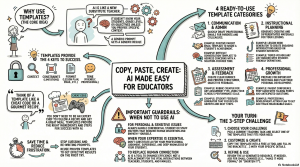
Copy, Paste, Create: AI Made Easy with Templates
Virtual Session
Presented by Sharon Hall
Session Description:
Transform your daily teaching tasks with ready-to-use AI templates that require no technical expertise. Explore practical 2-3 sentence prompts for creating emails, vocabulary lists, rubrics, parent conference prep, and more. This session focuses on copy-paste simplicity, showing educators how to harness AI’s power for professional communications, instructional planning, assessment, and professional growth without becoming tech experts.
Objectives:
-
- Use 4 different AI prompt templates immediately in their practice.
- Adapt basic templates to their specific classroom contexts.
- Create professional communications, instructional materials, and planning resources using AI.
- Understand when and why to use different prompt strategies.
- Feel confident taking first steps with AI tools in education.
Copy of Copy, Paste, Create AI Made Easy with Templates (Presentation)
Try It Activity:
Practice Makes Permanent
Research shows that applying new knowledge helps it stick. After watching the webinar, take a few minutes to complete the “Try It” activity. These hands-on tasks are simple, focused, and designed to reinforce key concepts so you can confidently use them in your classroom.
Try-It Activity Objective: Identify a real classroom task, customize an AI template, and generate a usable resource in minutes. Share your creation and suggest tips for other educators.
Estimated Time Required: 15 minutes
Practice using templates:
Follow these steps to practice customizing a template and generate a useful resource for your classroom.
Choose Your Challenge & Template
- Identify one current task/challenge from your teaching practice
- Use the document with templates shared during the session, then select the template category that best addresses your need
- Choose the specific template demonstrated in that category
- Access a free AI platform (ChatGPT, Claude, Gemini)
Customize & Create
- Copy the template and customize it for your specific situation
- Input your template into an AI platform
- Generate your resource (email, rubric, vocabulary list, etc.)
- Refine or regenerate as needed
Share Your Success
- Take a screenshot of your AI-generated resource
- Craft a social media post about your experience
- Required elements for post:
- Share the template category you used
- What you created (without sharing student-specific content)
- One tip to help other educators when trying AI templates
- Tag @TeachersFirst on X and use #TeachersFirstAI or email to ok2ask@sflinc.org
Upon completion of this activity, you leave with a finished resource you can use tomorrow and a clear, repeatable process you can apply to your next teaching task. Expand your journey with AI templates by exploring the resources shared below.
Resource Materials:
In this Resource Materials section, you will find reference materials, tutorials, and how-to information that will help you review or extend your knowledge from the presentation.
Resources from TeachersFirst
-
- Templates used during this session: https://docs.google.com/document/d/189TcKDg5HKQf_PsXHp9B18jZUMEafs3z7BJuyBvroXI/copy
- OK2Ask (free, on-demand recording): AI Templates That Work: Quick & Easy Prompting Solutions
- Blog Post: Prompt Engineering for Teachers
- TeachersFirst Review: GenAI Chatbot Prompt Library for Educators
Other Resources
Mentioned During the Session
-
- Link to templates used during the session: Copy of prompts
- AI Chatbots: ChatGPT, Claude, Google Gemini
Videos
In-the-Classroom:
Our In-the-Classroom section is where you will find ideas and examples for integrating the tools shared into classroom instruction.