
3935 language-arts results | sort by:
 return to subject listing
Photopea - photopea.com
Grades
6 to 12
This site includes advertising.
In the Classroom
Previous experience with layer-based design software editing such as Photoshop is extremely beneficial. The Photopea Learn page provides helpful tutorials, but individuals without previous training may need additional support.Challenge students to learn about the different options and features included with Photopea, then create and share video tutorials for their peers using a screen recording tool like Free Screen Recorder Online, reviewed here. As your students become familiar with the different features, have students include their edited images in any multimedia projects. Include images when using Adobe Creative Cloud Express for Education, reviewed here, when creating videos, flyers, or websites. Include images with storytelling projects created with Sway, reviewed here.
You must be registered and logged in to add items to your favorites.
Use the form at the top of the page to log in, or click here to join TeachersFirst (it's free!).
Pedagog.ai - Priten Shaw
Grades
3 to 12tag(s): artificial intelligence (341), computers (114), creative writing (123), critical thinking (187), digital literacy (38), editing (95), images (271), media literacy (130), persuasive writing (49), politics (122), population (53), readers theater (11), shakespeare (98), vocabulary (252), vocabulary development (103)
In the Classroom
Include Pedagog.ai as part of your resources for using AI effectively to promote engagement and increase student understanding of classroom lessons. Use the suggested prompts to find ideas for creative activities and assessments, then modify the prompt to fit the needs of your classroom and students. Use the prompts within chat tools such as ChatGPT, reviewed here and Claude, reviewed here and continue asking questions and adding suggestions for making changes until you generate information that fits your needs. Use an organizational tool like Wakelet, reviewed here to save and share your favorite prompts. For example, create a collection of prompts for each subject or class you teach or work with peers to create prompt collections for assessments, lesson ideas, and incorporating teaching strategies.Add your comments below (available only to members) | Become a Member
You must be registered and logged in to add items to your favorites.
Use the form at the top of the page to log in, or click here to join TeachersFirst (it's free!).
CurriConnects Book List - The Artist's Eye - TeachersFirst
Grades
K to 12tag(s): artists (102), book lists (163), design (76), graphic design (51), reading lists (78)
In the Classroom
Build student literacy skills, reinforce what students are learning about Art, and help students build the important reading strategy of connecting what they read to prior (classroom!) knowledge. Share this link on your class web page or wiki so students can select independent reading books to accompany your unit on Art. Don't forget to share the list with the school and local libraries so they can bring in some of the books on interlibrary loan. CurriConnects are a great help for teachers who have lost school library/media specialists due to budget cuts.Add your comments below (available only to members) | Become a Member
You must be registered and logged in to add items to your favorites.
Use the form at the top of the page to log in, or click here to join TeachersFirst (it's free!).
OK2Ask: AI for Differentiation - TeachersFirst
Grades
K to 12In today's diverse classrooms, educators face the challenge of meeting the unique needs of every student. The rise of artificial intelligence (AI) tools offers exciting new opportunities to differentiate instruction to meet these needs. In this dynamic hands-on workshop, we'll explore the intersection of AI technology and the pedagogy behind differentiation to empower educators to create inclusive and effective learning environments. As a result of this session, teachers will: 1. Learn how to use AI technologies to support differentiated instruction in the classroom. 2. Develop a practical understanding of how to integrate AI tools with established differentiation strategies to create dynamic and inclusive learning experiences for all students. 3. Share ideas with other participants and plan to use AI to differentiate instruction in your learning environment. This session is appropriate for teachers at all technology levels.
tag(s): artificial intelligence (341), differentiation (102), OK2Askarchive (87), professional development (323)
In the Classroom
The archive of this teacher-friendly, hands-on webinar will empower and inspire you to use learning technology in the classroom and for professional productivity. As appropriate, specific classroom examples and ideas have been shared. View the session with a few of your teaching colleagues to find and share new ideas. Find additional information and links to tools at the session resource page. Learn more about OK2Ask and upcoming sessions here.Add your comments below (available only to members) | Become a Member
You must be registered and logged in to add items to your favorites.
Use the form at the top of the page to log in, or click here to join TeachersFirst (it's free!).
Hook the Boys on Reading - TeachersFirst
Grades
K to 5tag(s): book lists (163), reading lists (78)
In the Classroom
Read the article to remind yourself what interests male readers and consider some of the ideas for launching special activities directed specifically toward boys. Share the ideas with fellow teachers or your PTA/PTO as possible literacy initiatives.Add your comments below (available only to members) | Become a Member
You must be registered and logged in to add items to your favorites.
Use the form at the top of the page to log in, or click here to join TeachersFirst (it's free!).
OK2Ask: Strategies for Building Content Area Literacy - TeachersFirst
Grades
2 to 12Transform how students engage with texts across all subjects! This updated session explores research-based literacy strategies that work with material in any content area--from science articles to historical documents to mathematical word problems. Discover how to scaffold reading comprehension before, during, and after reading using proven techniques like THIEVES, Chunk & Chew, Frayer Models, and summarization. You'll also learn how free technology tools can enhance these strategies. Whether your students struggle with complex texts or need more challenge and engagement, these practical approaches will help every learner access and deepen their understanding of the content. This session is perfect for teachers across all disciplines who want to support literacy development while maintaining their subject area focus. As a result of this session, teachers will: 1. Implement comprehensive literacy strategies. 2. Enhance literacy instruction with technology. 3. Design content-specific literacy activities. This session is appropriate for teachers at all technology levels.
tag(s): literacy (124), OK2Askarchive (87), professional development (323), reading strategies (93)
In the Classroom
The archive of this teacher-friendly, hands-on webinar will empower and inspire you to use learning technology in the classroom and for professional productivity. As appropriate, specific classroom examples and ideas have been shared. View the session with a few of your teaching colleagues to find and share new ideas. Once registered, find additional reference materials, tutorials, and how-to information to help you review or extend your knowledge from the session in the handout posted on the session landing page. Resources may include additional ideas and examples on integrating the tools and strategies shared in classroom instruction. Learn more about OK2Ask and upcoming sessions here.Add your comments below (available only to members) | Become a Member
You must be registered and logged in to add items to your favorites.
Use the form at the top of the page to log in, or click here to join TeachersFirst (it's free!).
Grades 3-5 Research Resources for Teaching Remotely on Short Notice - TeachersFirst
Grades
3 to 5tag(s): professional development (323), Research (90)
In the Classroom
Incorporate videos, articles, and quizzes found in the National Geographic link as part of an overall learning experience using Curipod, reviewed here. As students complete their research projects provide a variety of options for sharing their learning. Ideas to include as options include Adobe Creative Cloud Express for Education, reviewed here, Clipchamp reviewed here, and Spotify for Podcasters, reviewed here.Add your comments below (available only to members) | Become a Member
You must be registered and logged in to add items to your favorites.
Use the form at the top of the page to log in, or click here to join TeachersFirst (it's free!).
NPR's Backseat Book Club - National Public Radio
Grades
4 to 12This site includes advertising.
tag(s): authors (114), book lists (163), independent reading (84), literature (214), reading lists (78)
In the Classroom
Though this program is over, the material is worth listening to. Visit the Backseat Book Club with students to select a book you are interested in reading. Then include students in the decision whether to read it as a class or just have several interested students read it. Encourage parents to read the books with their student by posting a link on your class or school library website.Comments
Add your comments below (available only to members) | Become a Member
You must be registered and logged in to add items to your favorites.
Use the form at the top of the page to log in, or click here to join TeachersFirst (it's free!).
Curious George - PBS Kids
Grades
K to 1tag(s): animals (278), dance (42), geometric shapes (152), matching (9), numbers (121), preK (323)
In the Classroom
Use the video clips or activities on your projector or interactive whiteboard. Use this site at centers to reinforce skills (counting, matching, learning shapes, and more). Share this link on your class website for students to access at home.Add your comments below (available only to members) | Become a Member
You must be registered and logged in to add items to your favorites.
Use the form at the top of the page to log in, or click here to join TeachersFirst (it's free!).
Christmas Escape Room - Genially
Grades
K to 7This site includes advertising.
tag(s): christmas (33), digital escapes (30), gamification (90), hanukkah (21), holidays (282), kwanzaa (23)
In the Classroom
Edit and personalize the questions in this escape room to create an engaging activity for students to complete during holiday parties. Include other December holidays, such as Kwanzaa and Hannukah, to create a multicultural holiday escape room. Visit TeachersFirst Special Topics Pages Kwanzaa, reviewed here, Christmas Resources, reviewed here, and Hannukah Resources, reviewed here to find resources to include with a multicultural holiday escape room.Add your comments below (available only to members) | Become a Member
You must be registered and logged in to add items to your favorites.
Use the form at the top of the page to log in, or click here to join TeachersFirst (it's free!).
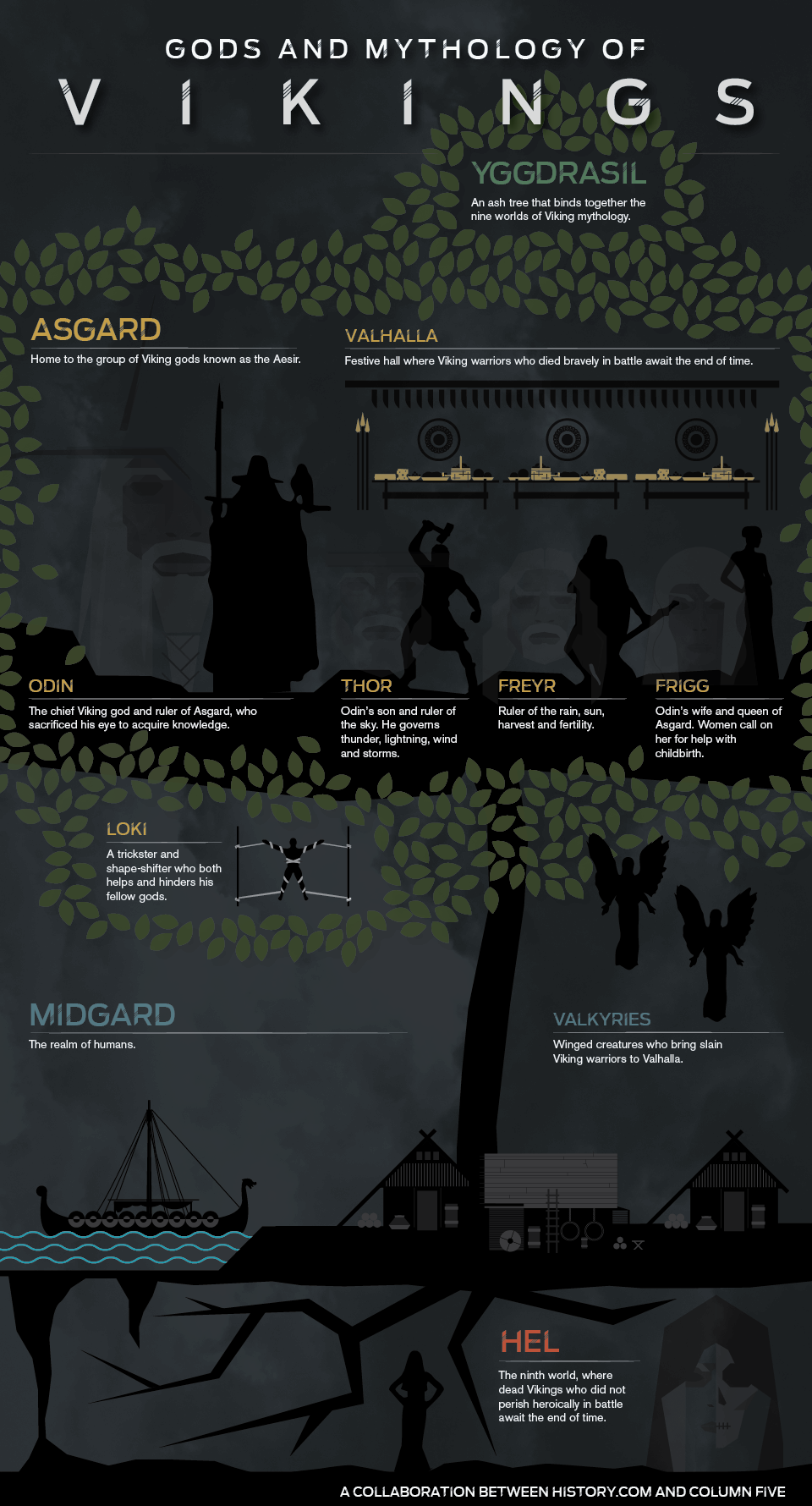
Gods and Mythology of the Vikings - History.com and Column Five
Grades
6 to 12tag(s): myths and legends (44), vikings (11)
In the Classroom
Use this infographic in conjunction with a study of Viking Mythology. Divide the students into small groups to investigate the different terms mentioned on the infographic. Have the students present their findings to the class by creating a multimedia presentation using one of the many TeachersFirst Edge tools, reviewed here. You might consider having students use Nordic Gods, reviewed here, to gather some basic information about the gods, Asgaard, etc.Add your comments below (available only to members) | Become a Member
You must be registered and logged in to add items to your favorites.
Use the form at the top of the page to log in, or click here to join TeachersFirst (it's free!).
Gemini Notebook (formerly NotebookLM) - Google
Grades
K to 12tag(s): artificial intelligence (341), note taking (36), Teacher Utilities (223), timelines (60)
In the Classroom
Use NotebookLM to support and engage students in many different ways. Upload lessons and documents to create and share study guides with students. Create and share an audio podcast at the start of a new unit to engage students in the upcoming lessons. Share the video with students to include when reviewing materials for upcoming assessments. Use NotebookLM to create a study guide, copy it, and paste it into a quiz tool that uses AI, such as Quizlet reviewed here to create flashcards and study materials for your students or Gibbly, reviewed here to create a quiz. Create a short tutorial using Free Online Screen Recorder, reviewed here on the features and how to use NotebookLM to share with parents for use at home to create study guides for classroom lessons.Add your comments below (available only to members) | Become a Member
You must be registered and logged in to add items to your favorites.
Use the form at the top of the page to log in, or click here to join TeachersFirst (it's free!).
MLA Digital Escape Room - John S. Bailey Library
Grades
9 to 12tag(s): citations (30), digital escapes (30)
In the Classroom
Before students complete the MLA Digital Escape Room, give them a scavenger hunt worksheet with different citation challenges (such as find the correct MLA format for a book, article, or website). Prepare incorrect MLA citations and display them on the board. Students must identify errors and correct them before the teacher does. After completing the digital escape room, students could work in small groups to design their own MLA-themed escape room using Genially, reviewed here or Google Forms, reviewed here.Add your comments below (available only to members) | Become a Member
You must be registered and logged in to add items to your favorites.
Use the form at the top of the page to log in, or click here to join TeachersFirst (it's free!).
Yippy - Yippy, Inc.
Grades
2 to 8This site includes advertising.
tag(s): search engines (42), search strategies (18)
In the Classroom
Use for any topic in any subject area. For example, a search for evolution revealed the following clusters: Texas Board, Biology, Human, and Theory. View more options by clicking on all clouds at the bottom of the list. Discuss with your class what kind of information about the topic that you are looking for before choosing a cloud. Have a broad concept to discuss in class? Assign a specific cloud to each group of students and have them report their findings back to the class. Have a class discussion about how all of the pieces of information fit together. Create a class concept map that ties all the information together. Use a tool such as bubbl.us (reviewed here) to create and share the concept maps.Add your comments below (available only to members) | Become a Member
You must be registered and logged in to add items to your favorites.
Use the form at the top of the page to log in, or click here to join TeachersFirst (it's free!).
Teacher Lists - School Family Media
Grades
K to 12tag(s): classroom management (143), preK (323)
In the Classroom
Create a TeacherLists account for your building or teaching team and distribute your supply list or a wish list in an easy to find format for parents to access anytime and anywhere. Share what your class specifically needs to be ready for the start of school or a new marking period. Include the links to your lists on your class web page. Library/media specialists can share a schoolwide list to keep the media center well stocked with supplies. Art teachers can request the craft items and supplies they need. Even grandparents can help out the school when they know what is needed. Share with your school's parent organization for creating their own lists.Add your comments below (available only to members) | Become a Member
You must be registered and logged in to add items to your favorites.
Use the form at the top of the page to log in, or click here to join TeachersFirst (it's free!).
Narakeet - Gojko Adzic
Grades
K to 12tag(s): chinese (38), conversions (37), german (49), greek (45), italian (31), japanese (53), multilingual (84), portuguese (21), russian (25), spanish (112), text to speech (23)
In the Classroom
Although presentations are uploaded as PowerPoint documents, Narakeet is still easy to use with Google Slides. Upload your Google Slide presentations to the Free Office Online Apps, reviewed here, and save as a PowerPoint presentation. Use Narakeet to share information with world language learners to hear the text spoken in the native language. Use this site with ENL/ELL students to convert small pieces of text to their native language. Use this site with students who have difficulty reading, especially when working with more challenging passages and text. Use the video options to convert student presentations into videos, then share presentations on your class website. Narakeet is also a handy option to use when creating flipped learning lessons. Upload the lesson as a slide presentation, and then convert it to a video file for easy viewing by students.Add your comments below (available only to members) | Become a Member
You must be registered and logged in to add items to your favorites.
Use the form at the top of the page to log in, or click here to join TeachersFirst (it's free!).
Wikipedia Timeline Generator - Class Tools
Grades
3 to 12This site includes advertising.
tag(s): timelines (60)
In the Classroom
Bookmark and save this handy tool for many classroom uses. Displayed through a visual timeline, this is an excellent way for students to look at information and provide context through the order of events. Create a timeline to share on your interactive whiteboard when studying historical characters and events. Use the editing tool to narrow down information by specific dates or delete items irrelevant to your lesson. Ask students to compare and contrast people or events to help them get perspective on events leading up to important moments in history. For example, create a timeline for Thomas Jefferson and another for Alexander Hamilton and ask students to compare and contrast important events in their lives and consider how these impacted their view on America's founding principles. Have students share their reflections and information on a simple webpage created using Carrd, reviewed here. Expand learning further by asking students to use a presentation tool such as Sway, reviewed here, to demonstrate understanding. Ask students to include a link to their Wikipedia timeline along with images, Venn diagram comparisons, and other information found during their research. You can even use this tool for classic novels! Try searching Gone With the Wind..Add your comments below (available only to members) | Become a Member
You must be registered and logged in to add items to your favorites.
Use the form at the top of the page to log in, or click here to join TeachersFirst (it's free!).
OK2Ask: Effective Feedback for Student Growth - TeachersFirst
Grades
K to 12Elevate your classroom culture with feedback that helps students thrive. This updated session moves beyond theory to explore practical strategies for teacher and peer feedback that accelerates learning. Discover the pedagogical foundations of effective feedback, learn to create and use feedback stems that guide meaningful responses, and explore strategic pairing and grouping methods that maximize peer learning. We'll examine how to model feedback for students, build feedback banks that save time while maintaining quality, and use technology tools to streamline the feedback process. Whether you're looking to enhance your own feedback practice or teach students to give meaningful responses to each other, this session provides concrete strategies that work across content areas and grade levels. As a result of this session, teachers will: 1. Apply effective feedback strategies. 2. Implement peer feedback systems. 3. Integrate technology for feedback efficiency. This session is appropriate for teachers at all technology levels.
tag(s): feedback (16), OK2Askarchive (87)
In the Classroom
The archive of this teacher-friendly, hands-on webinar will empower and inspire you to use learning technology in the classroom and for professional productivity. As appropriate, specific classroom examples and ideas have been shared. View the session with a few of your teaching colleagues to find and share new ideas. Once registered, find additional reference materials, tutorials, and how-to information to help you review or extend your knowledge from the session in the handout posted on the session landing page. Resources may include additional ideas and examples on integrating the tools and strategies shared in classroom instruction. Learn more about OK2Ask and upcoming sessions here.Add your comments below (available only to members) | Become a Member
You must be registered and logged in to add items to your favorites.
Use the form at the top of the page to log in, or click here to join TeachersFirst (it's free!).
Jonathan Allen Homepage - Andersen Press
Grades
1 to 5tag(s): authors (114)
In the Classroom
Share this site with your students if you read these books together.Add your comments below (available only to members) | Become a Member
You must be registered and logged in to add items to your favorites.
Use the form at the top of the page to log in, or click here to join TeachersFirst (it's free!).
'45 Words' Video Lesson - NewseumED
Grades
8 to 12tag(s): civil rights (221), constitution (104), media literacy (130)
In the Classroom
Whether studying the First Amendment or media literacy, upload this video to a tool such as EDPuzzle, reviewed here, to edit the video to show only portions you select, or to pause the video automatically and add questions for students to answer, and/or add your verbal comments. Some of the Discuss questions would be appropriate to insert after viewing parts of the video. Break students into small groups after the video and assign them different Discuss questions for reflection and investigation. Challenge small groups to create a presentation to share what they learned using a tool like Google Slides, reviewed here. After watching and discussing the video, extend either a media literacy unit or a civics/government unit. Do this by asking students to view news articles in our present political situation i.e. election time, civil rights discussed, etc. Then have them compare how the news media during the late 1700s would have handled issues of today, and how politicians of the Federalist party would have reacted to our issues today. Alternatively, have students create a simple infographic comparing the problems in the news of then and now. Use a tool such as Infogram, reviewed here.Add your comments below (available only to members) | Become a Member
You must be registered and logged in to add items to your favorites.
Use the form at the top of the page to log in, or click here to join TeachersFirst (it's free!).
Add your comments below (available only to members) | Become a Member
Close comment form