
3102 english results | sort by:
 return to subject listing
edX - Anant Agarwal
Grades
8 to 12
This site includes advertising.
tag(s): aeronautics (10), architecture (81), artificial intelligence (358), china (79), circuits (19), civil rights (228), computers (102), electricity (63), engineering (136), environment (245), evolution (85), folktales (34), greeks (45), magnetism (40), medicine (52), nutrition (140), poetry (194), psychology (60), religions (120), shakespeare (99), solar energy (35), speech (64), statistics (127), terrorism (40)
In the Classroom
Share with students on your interactive whiteboard and take the demo course together. This is perfect for use with gifted and advanced students as an option for college-level courses and enrichment. Allow gifted students to enroll in courses that interest them or that provide enrichment beyond classroom content. Share with others in your building, as a resource for professional development. Explore topics yourself to find new, engaging ones to round out your expertise. Allow students to enroll in a course that aligns with their career goals as an exploratory opportunity in that field.You must be registered and logged in to add items to your favorites.
Use the form at the top of the page to log in, or click here to join TeachersFirst (it's free!).
Childhood Reading.com - Life Long Love of Reading Begins With a Book - ChildhoodReading.com
Grades
K to 8This site includes advertising.
tag(s): folktales (34), stories and storytelling (81)
In the Classroom
Copy/paste the text into a clear page to share on a projector or interactive whiteboard. Have students highlight their favorite passages or examples of characterization. Have students create story maps of these classic tales or produce their own "skit" versions to record on video and share on TeacherTube, reviewed here. Make this resource available on your teacher public page for students to select and read their stories of choice during a unit on folktales/fairy tales. World language classes can read these English language versions of tales from land/language they are studying and write dialog between characters in their new language. Have students create an online or printed comic using one of the tools and ideas included in this Comics and Cartoons collection.Add your comments below (available only to members) | Become a Member
You must be registered and logged in to add items to your favorites.
Use the form at the top of the page to log in, or click here to join TeachersFirst (it's free!).
Cubing and Think Dots Strategy - Eulouise Williams
Grades
3 to 12tag(s): blooms taxonomy (7), differentiation (103), learning styles (23), professional development (307)
In the Classroom
Use ideas from this PDF to differentiate and offer a variety of learning opportunities to students. Share this site and the strategies with peers during professional development sessions. Have students create cubes or think dots of their own for use when reviewing material for tests and quizzes.Add your comments below (available only to members) | Become a Member
You must be registered and logged in to add items to your favorites.
Use the form at the top of the page to log in, or click here to join TeachersFirst (it's free!).
WikiWand - Lior Grossman & Ilan Lewin
Grades
5 to 12tag(s): media literacy (137), writing (304)
In the Classroom
Install WikiWand on classroom computers to improve student viewing of Wikipedia. Share on your interactive whiteboard to demonstrate and view features for student use. If you do recommend Wikipedia as a source for research, be sure to have the discussion about its unknown authorship and usefulness as a general information tool but not as a "scholarly" resource. As a challenge to your better writers, consider asking them to write entries that you can submit to this encyclopedia on classroom topics in simpler English. They will have to analyze their own language and writing style with far greater scrutiny than ever before. Or have the class create a two version wiki glossary of your own on curriculum topics in any discipline, using this as a model for the "easy reading" side.Add your comments below (available only to members) | Become a Member
You must be registered and logged in to add items to your favorites.
Use the form at the top of the page to log in, or click here to join TeachersFirst (it's free!).
Classmill - Tariq Rauf
Grades
6 to 12tag(s): classroom management (154)
In the Classroom
Create your course and offer it to your students for greater interaction and learning through community building. Find great ideas from other existing courses. Teachers of gifted can use courses to challenge students in their areas of interest. You can also have gifted students create or collaborate on a student-made "course." Explore the topics yourself for some new, engaging topics to round out your own expertise. Allow students to enroll in a course that would fit into their career goals as an exploratory opportunity in that field.Add your comments below (available only to members) | Become a Member
You must be registered and logged in to add items to your favorites.
Use the form at the top of the page to log in, or click here to join TeachersFirst (it's free!).
Random.org - Dr. Mads Haahr
Grades
K to 12tag(s): DAT device agnostic tool (134), gamified learning (78), probability (134), resources (79)
In the Classroom
Use Random.org to generate any kind of list you need such as groups for field trips, random dates for history research, and random places on a map. Use the name generator to select a student to do an activity or to answer a question. Allow students to use the name generator to choose the classmate who comes next. Use the generator tools as part of your probability unit to chart how often names or coins appear with random selections.Add your comments below (available only to members) | Become a Member
You must be registered and logged in to add items to your favorites.
Use the form at the top of the page to log in, or click here to join TeachersFirst (it's free!).
Photos for Class - Clever Prototypes, LLC
Grades
K to 12tag(s): images (276), photography (136), search engines (41)
In the Classroom
Have students use this site for Creative Common images for any report, newsletter, or project. The images from this site are all supposed to be G-Rated for classroom use. The search engine uses Flickr safe search, and other built-in filtering so all images produced should be appropriate for school use. Have students create an annotated image or build a story including text boxes and related links using images found on this tool and a tool such as Thinglink, reviewed here. Be sure to keep a link to this site on your wiki, blog, or web page for students to use whenever they are working on a project.Add your comments below (available only to members) | Become a Member
You must be registered and logged in to add items to your favorites.
Use the form at the top of the page to log in, or click here to join TeachersFirst (it's free!).
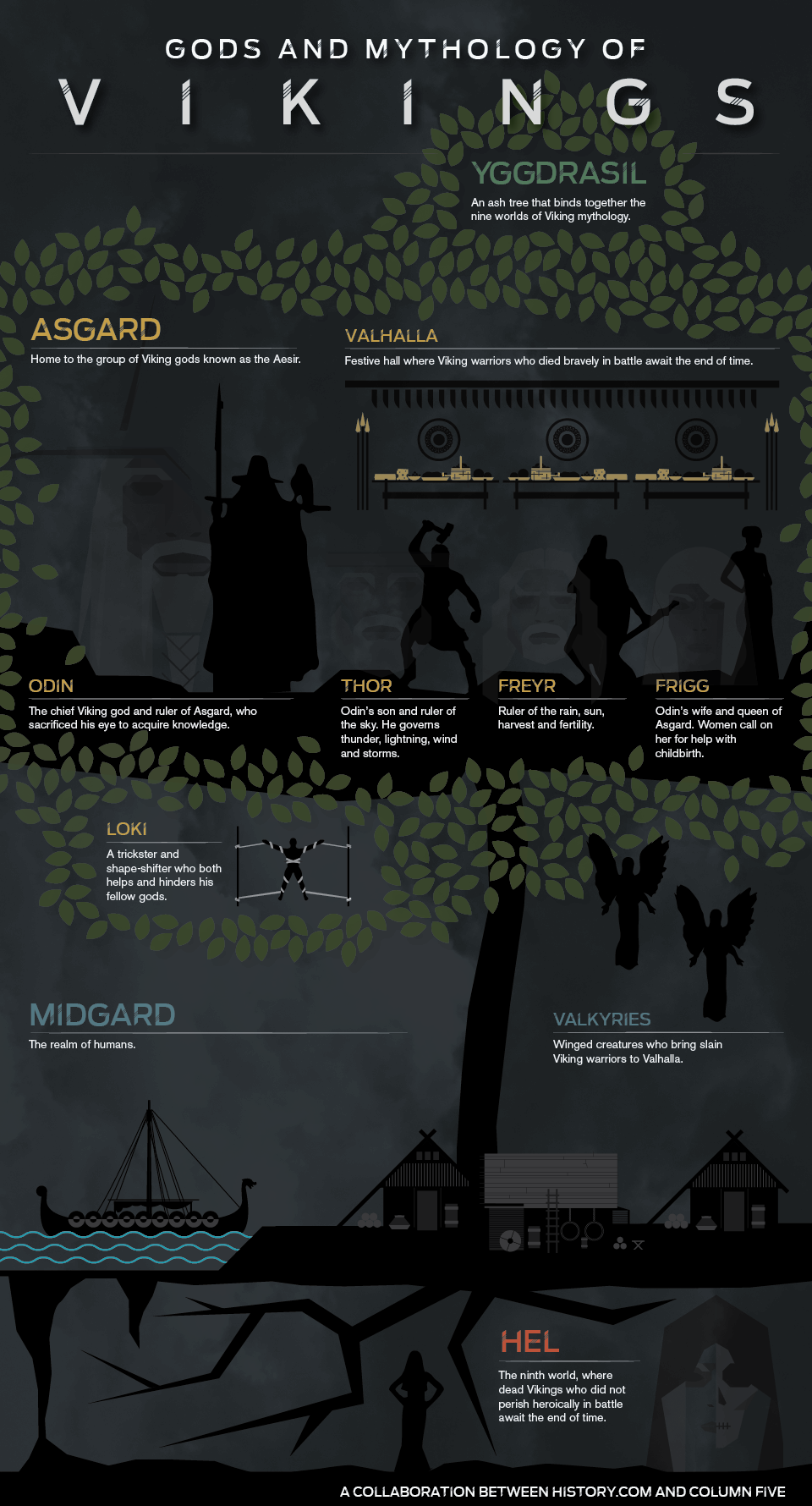
Gods and Mythology of the Vikings - History.com and Column Five
Grades
6 to 12tag(s): myths and legends (44), vikings (11)
In the Classroom
Use this infographic in conjunction with a study of Viking Mythology. Divide the students into small groups to investigate the different terms mentioned on the infographic. Have the students present their findings to the class by creating a multimedia presentation using one of the many TeachersFirst Edge tools, reviewed here. You might consider having students use Nordic Gods, reviewed here, to gather some basic information about the gods, Asgaard, etc.Add your comments below (available only to members) | Become a Member
You must be registered and logged in to add items to your favorites.
Use the form at the top of the page to log in, or click here to join TeachersFirst (it's free!).
Assessments for Learning - 2014 Edcite Inc.
Grades
1 to 8tag(s): assessment (142), study aid (175), test prep (68)
In the Classroom
Use technology to motivate and engage your students. Give these quality text passages personalized to your class needs. Use as a teaching tool on your interactive whiteboard or projector. Continue to use individually or as small group instruction. Pair a weak reader with a strong reader for independent pair work. You can easily differentiate by creating tiered assignments to meet each students' needs. Share at your next staff meeting to provide collaboration between teachers. Use in a flipped classroom and have students complete the work at home. They will still receive immediate feedback! Use at parent gatherings to provide an example of the grade level expectations. Put on your classroom website as a way to practice at home. Before assigning questions to individual students you might want to check the readability of the questions or supplied readings. Use a tool such as The Readability Test Tool, reviewed here. This reviewer found the articles in some grade levels to be about two years higher in reading level than the grade listed for the question.Add your comments below (available only to members) | Become a Member
You must be registered and logged in to add items to your favorites.
Use the form at the top of the page to log in, or click here to join TeachersFirst (it's free!).
Analyze My Writing - analyzemywriting.com
Grades
4 to 12tag(s): creative writing (123), descriptive writing (41), expository writing (25), paragraph writing (14), persuasive writing (46), word clouds (12), writers workshop (28)
In the Classroom
Share this excellent tool with your students for use with any writing project. Discuss ways to elevate the level of any writing piece by analyzing results found. Challenge students to increase the difficulty of readability or add interest to writing by using less common words. Be sure to include a link on your class webpage and have students print out a copy of the writing analysis to include with writing projects. Use this tool to polish your professional writing, parent newsletters, blog posts, and papers for grad classes!Add your comments below (available only to members) | Become a Member
You must be registered and logged in to add items to your favorites.
Use the form at the top of the page to log in, or click here to join TeachersFirst (it's free!).
StoryMap JS - Northwest University Knight Lab
Grades
7 to 12tag(s): maps (222), stories and storytelling (81), timelines (61)
In the Classroom
Be sure to stress Fair Use and Copyright with students when using online images and crediting sources. Find great resources and information on TeachersFirst. Of course, if possible use your own images. In Science, use this tool to upload a picture of a science experiment from class and retell the story of the "experiment" by connecting with each of the individual parts of the image. In a Technology class, use this tool to create a project of anything that could be considered "mappable." Some examples include a timeline tour of an event, tour routes of a favorite band, the movement of a character in a movie or novel, or various events in a War. Find various shapes in nature and buildings for a Geometry class, showing their locations in a map. This tool would be wonderful for gifted students to showcase an interest or extend learning from a concept learned in class. Use this tool to trace the history of various recipes or ingredients in a Family and Consumer Science class. Trace the history of people, religions, and events. In Science, create a tour of various animals found in specific areas of a given biome or locations of various types of rocks and their information around the world.Add your comments below (available only to members) | Become a Member
You must be registered and logged in to add items to your favorites.
Use the form at the top of the page to log in, or click here to join TeachersFirst (it's free!).
Training Games - Thiagi.com
Grades
7 to 12tag(s): back to school (57), debate (39), firstday (27), game based learning (323)
In the Classroom
Use this resource for Back to School getting to know you activities. Choose games labeled "Opener" as activators for prior knowledge on any topic. Use ideas to incorporate into professional development sessions.Add your comments below (available only to members) | Become a Member
You must be registered and logged in to add items to your favorites.
Use the form at the top of the page to log in, or click here to join TeachersFirst (it's free!).
ABC Education - ABC
Grades
K to 10tag(s): addition (136), animals (281), antarctica (28), atmosphere (25), australia (27), cells (82), climate change (112), continents (30), counting (58), decimals (90), division (108), earth (187), earthquakes (51), ecosystems (115), egypt (60), energy (136), environment (245), food chains (25), forces (54), forensics (12), fossil fuels (11), game based learning (323), gold rush (20), human body (97), immigration (86), insects (64), light (61), maps (222), molecules (43), money (112), multiplication (131), nuclear energy (20), nutrition (140), oceans (141), parts of speech (39), percent (59), perimeter (21), place value (42), plants (141), probability (134), rhymes (24), rocks (42), songs (50), sound (71), subtraction (115), time (98), vietnam (41), volcanoes (60), weather (170), whole numbers (8), world war 1 (88), world war 2 (169)
In the Classroom
This site is excellent for enrichment. Include it on your class web page for students to access both in and out of class. Share this link on your class web page and/or in a parent newsletter for help with homework and school projects. These high-quality media resources will engage your students and enhance their learning.Add your comments below (available only to members) | Become a Member
You must be registered and logged in to add items to your favorites.
Use the form at the top of the page to log in, or click here to join TeachersFirst (it's free!).
Free Online Stopwatch - Ummay
Grades
K to 12tag(s): classroom management (154), organizational skills (92)
In the Classroom
There are many uses for this practical online tool. At the beginning of the school year, display on your interactive whiteboard or projector to time or count down any classroom activity. This will get the students in the habit of checking how much time they have left. Project the Stopwatch or Timer while students take a test, solve a drag and drop, practice speeches, rotate between learning centers, or join cooperative learning groups. When rotating between centers or taking turns in a cooperative learning group, schedule the time sequence to keep everyone on track. Use the Date Countdown to share days until any important event via social media. Share this tool on your class website for students to use at home (to practice taking timed math practice tests, practice for a speech, and more).Add your comments below (available only to members) | Become a Member
You must be registered and logged in to add items to your favorites.
Use the form at the top of the page to log in, or click here to join TeachersFirst (it's free!).
Factile - (was Jeopardy Rocks) - Solis Creative LLC
Grades
3 to 12tag(s): gamified learning (78), quiz (58), quizzes (84), study aid (175)
In the Classroom
Jeopardy games are a great way to review all types of information, in any subject, with your students. As part of the review, have small groups of students take a category and create the Jeopardy game. Have students create a Jeopardy quiz for their classmates to take after they give a presentation. Learning support teachers may want to have small groups create the review quizzes since creating the quiz is a great way to reinforce content. Share a link to any Jeopardy Rocks activity on your class website or blog for student use at home.Add your comments below (available only to members) | Become a Member
You must be registered and logged in to add items to your favorites.
Use the form at the top of the page to log in, or click here to join TeachersFirst (it's free!).
Little Shop of Writers - Maria Anderson
Grades
4 to 12tag(s): creative writing (123), essays (15), expository writing (25), homonyms (9), homophones (7), punctuation (23), spelling (96), writing (304)
In the Classroom
Share these videos on your interactive whiteboard or projector with students when you want to introduce or review one of the writing skills addressed. Put a link to the videos on your class website for students and parents to use at home. Bookmark collections of favorite videos (and other tools) for writing and grammar instruction for quick access using a tool like Papaly, reviewed here. Challenge students to create their own writing videos to "teach" the class, using Powtoon, reviewed here. Share the videos on a tool such as SchoolTube, reviewed here.Add your comments below (available only to members) | Become a Member
You must be registered and logged in to add items to your favorites.
Use the form at the top of the page to log in, or click here to join TeachersFirst (it's free!).
Uncle Tom's Cabin and American Culture - University of Virginia
Grades
8 to 12tag(s): 1800s (90), abolition (14), african american (130), civil rights (228), civil war (148), history day (38), racism (84), slavery (82)
In the Classroom
Whether you are approaching Uncle Tom's Cabin from a literary perspective or a historical perspective, the primary sources here are deep and offer a variety. Listen to minstrel songs, view advertisements for performances, or read poems and other literary responses to the work. Because much of the site contains material that is rooted in a 19th century perspective on race, you should screen images, texts, and lyrics, and ensure that students understand their context before using them in the classroom.Add your comments below (available only to members) | Become a Member
You must be registered and logged in to add items to your favorites.
Use the form at the top of the page to log in, or click here to join TeachersFirst (it's free!).
Typeform - Robert Munoz
Grades
K to 12This site includes advertising.
tag(s): DAT device agnostic tool (134), polls and surveys (44), quizzes (84)
In the Classroom
This free tool is an excellent way to determine the value or rating of various items. Use this in science class to poll students on multiple types of renewable and nonrenewable energies as cheap/expensive and clean/dirty for the environment. Poll students on types of cars, rating the cost and gas mileage. Follow up with research into the various makes and models. Poll about famous presidents and multiple influences on the economy and society. Compare characters in various novels in terms of motivation and other characteristics. In younger grades, gather data about students' favorite animals and why (such as fluffy/ferocious) or favorite colors and mood. Learn more about your students by polling them on various social and cultural topics, such as fashion, movies, and songs. Use this to identify misconceptions and resistance to various subject areas. Identify foods and feelings for each specific kind of food in Family and Consumer Science or attitudes towards multiple sports. Conduct specific polls for Introduction to Psychology or Sociology about various topics and reactions to the issues. Use to poll students on project ideas or to determine responses to current events. Older students may want to include polls on their student blogs or wiki pages to increase involvement or create polls to use at the start of project presentations. Use polls to generate data for math class (graphing), during elections, or for critical thinking activities dealing with the interpretation of statistics. Use "real" data to engage students in issues that matter to them. For Professional development, rate different technology tools based on ease of use and difficulty, as well as high and low value for instruction. Place a poll on your classroom web page as a homework inspiration or to increase parent involvement. Gifted students would love this tool to dig deeply into the multiple facets of issues they worry about.Add your comments below (available only to members) | Become a Member
You must be registered and logged in to add items to your favorites.
Use the form at the top of the page to log in, or click here to join TeachersFirst (it's free!).
Pinup - Martin Tajur
Grades
5 to 12tag(s): bulletin boards (12), homework (27), organizational skills (92), study aid (175)
In the Classroom
There are any number of ways to use Pinup! Introduce how to use Pinup on your interactive whiteboard or projector. Demonstrate how to use the checklist to mark off completed items. Have students use this as a way to organize their reminders and homework. With younger students use with a whole-class email account and list items to be accomplished for the day. Display the list on your interactive whiteboard or projector. Have a student scribe check off completed items. Use this site with a whole-class email account to organize a major research project. Keep track (or share) sites to help students study for the big test. Provide this link on your class website for students (or parents) to access at home. Help students build organizational skills with this engaging and useful tool. If your students have a whole-class email account, use a class canvas to display ideas as student brainstorm or respond from their smart phones (if allowed in class). With the canvas open on a projector (interactive whiteboard), their ideas will appear instantaneously. Use Pinup to display and label images. Beginning ENL/ELL students can drag and drop images and label them in their new language. Use Pinup as and idea bin for writing or projects or any brainstorm list.Add your comments below (available only to members) | Become a Member
You must be registered and logged in to add items to your favorites.
Use the form at the top of the page to log in, or click here to join TeachersFirst (it's free!).
Mental Floss - Felix Dennis
Grades
6 to 12This site includes advertising.
tag(s): animals (281), famous people (40), grammar (142), quizzes (84), trivia (17)
In the Classroom
Share Mental Floss on your class web page in any science, history, health, or reading class in middle school and up. Use it as a place for students to discover research topics related to your subject or as prompts for blog posts to get kids writing about something that interests them. Make a regular extra credit offering for students to write a blog post responding to something they learn here. If you have trouble getting students to read informational text, use these factoids as introductions to draw their interest before offering a longer article. Use these articles as starters for information literacy activities. Have partners research to find a corroborating (or debunking) source for the trivia offered here. English teachers will love some of the quick articles on misused or frequently misspelled words. Invite your students in any subject to find an article related to your subject and to create a poster version of that tip or tale using a tool such as Web Poster Wizard (reviewed here).Comments
Awesome for so many topics. Blog post ideas! Love the layout and diversity.Patricia, NJ, Grades: 6 - 12
Add your comments below (available only to members) | Become a Member
You must be registered and logged in to add items to your favorites.
Use the form at the top of the page to log in, or click here to join TeachersFirst (it's free!).
Add your comments below (available only to members) | Become a Member
Close comment form