
3487 science results | sort by:
 return to subject listing
Institution for Arts Integration and STEAM - Education Closet
Grades
K to 12
tag(s): architecture (81), professional development (307), robotics (29), STEM (385)
In the Classroom
Look at the back issues of ArtsEd LAB for different articles to see if you want to subscribe to ArtsEd LAB. Find ideas for incorporating art into science, technology, engineering, and math classes. Share with colleagues and at professional development meetings for any relevant ideas.You must be registered and logged in to add items to your favorites.
Use the form at the top of the page to log in, or click here to join TeachersFirst (it's free!).
Happier - Nataly Kogan
Grades
3 to 12tag(s): emotions (78), mental health (63), psychology (60), social and emotional learning (221)
In the Classroom
With testing, social pressure, and the desire to do well use Happier in class to reinforce social-emotional learning (SEL) by celebrating the small steps and successes on which students should be focusing. Teach students to identify positives along the way, no matter what the test or situation's outcome. Consider asking what did you learn from the situation? Identify categories that encompass all of the student's lives and focus on finding happy moments in all areas. Be sure to use this yourself! Find the positives in every facet of your day building happiness day by day. Psychology and Sociology classes can use this as an experiment about happiness, collecting student or family data through the year.Add your comments below (available only to members) | Become a Member
You must be registered and logged in to add items to your favorites.
Use the form at the top of the page to log in, or click here to join TeachersFirst (it's free!).
GoConqr - ExamTime Ltd
Grades
6 to 12tag(s): classroom management (154), flash cards (46), homework (27), mind map (31), quizzes (84), social networking (54), study aid (175), test prep (68)
In the Classroom
Share GoConqr with students to build and use study skills. Although an individual can use the site on their own, it is best to use it as a sharing site for study information. Encourage students to sign up and build a network of friends for creating and sharing resources. Learning support teachers and teachers of gifted-but-disorganized students will want to share the tools and encourage their students to create groups and collaborate with their peers. Have students create review activities and swap them with peers. Use this tool with colleagues to co-create materials to use with content units or materials to use for flipping the classroom. Use this tool for professional development.Edge Features:
Parent permission advised before posting student work created using this tool
Includes social features, such as "friends," comments, ratings by others
Requires registration/log-in (WITH email)
Premium version (not free) includes additional features or storage
Multiple users can collaborate on the same project
Add your comments below (available only to members) | Become a Member
You must be registered and logged in to add items to your favorites.
Use the form at the top of the page to log in, or click here to join TeachersFirst (it's free!).
Odyssey - CartoDB
Grades
6 to 12tag(s): digital storytelling (182), gamified learning (78), images (276), interactive stories (23), maps (222)
In the Classroom
Most storytellers will find a bit of a learning curve to working with Odyssey, click on the three bars on the left top of the home page to find the Quick Start Guide tutorial for using the site. Share this site with tech-savvy students so they can be experts and help others become familiar with using the site. Use Odyssey for creating map-based stories based on works of literature, important events in history, or mapping scientific discoveries. Odyssey is perfect for use with gifted students when creating multimedia presentations.Add your comments below (available only to members) | Become a Member
You must be registered and logged in to add items to your favorites.
Use the form at the top of the page to log in, or click here to join TeachersFirst (it's free!).
Giphy - Jace Cooke & Alex Chung
Grades
K to 12tag(s): animation (73), images (276), photography (136)
In the Classroom
Share an animated GIF to get student's attention! A cat reading a book is one way to begin reading time! Show any science concept a student should look at several times to see every aspect of the event. Some ideas to search for might be the development of an organism, cell division, a chemical reaction, formation of stars, or a bullet in slow motion. Do you want to reveal portions of a video outlining the travels of historic expeditions, addition of the states to the US, or any other historical event captured in a video? Use a looping animated GIF! Every subject could use one of these GIFs to generate interest in a class activity or new content. Use these examples as inspiration to create your own animated GIF's using GIFMaker, reviewed here.Add your comments below (available only to members) | Become a Member
You must be registered and logged in to add items to your favorites.
Use the form at the top of the page to log in, or click here to join TeachersFirst (it's free!).
Anchor Activities - Mr. Snyder's Science Class - Jon Snyder
Grades
5 to 7tag(s): crosswords (25), printables (36), vocabulary (260), worksheets (72)
In the Classroom
Take advantage of these free downloads to use as science centers, extra credit, or for use in science notebooks. Use these examples to create your own activities, or have students create activities for classmates.Add your comments below (available only to members) | Become a Member
You must be registered and logged in to add items to your favorites.
Use the form at the top of the page to log in, or click here to join TeachersFirst (it's free!).
Ecosystem Explorer - PBS LearningMedia
Grades
4 to 9This site includes advertising.
tag(s): animal homes (55), animals (281), ecology (112), ecosystems (115), habitats (113)
In the Classroom
Use this as an introductory activity into ecology. Students can work together on the same animals or have a group work together at exploring all three. Identify some similarities or differences between the needs and environments of all three animals. Use an online tool such as Interactive Three-Circle Venn Diagram, reviewed here, to help with the comparison. Identify some common issues with conservation, interaction with humans, and other issues facing these animals today. Extend the discussion with a student project, researching other organisms found within any of these three environments.Add your comments below (available only to members) | Become a Member
You must be registered and logged in to add items to your favorites.
Use the form at the top of the page to log in, or click here to join TeachersFirst (it's free!).
Lightning Maps - Blitzortung.org
Grades
4 to 12This site includes advertising.
tag(s): weather (170)
In the Classroom
When discussing the weather, use this resource for locating the current position of lightning strikes. Use this resource as an introduction to weather. Student groups can brainstorm what they observe, on the maps, to determine why thunderstorms form. Research various types of clouds and storm systems and how they form. Create a challenge in your class and view various weather maps to determine where students predict the next lightning strikes will form.Add your comments below (available only to members) | Become a Member
You must be registered and logged in to add items to your favorites.
Use the form at the top of the page to log in, or click here to join TeachersFirst (it's free!).
Breaking News Generator - Russell Tarr
Grades
4 to 12tag(s): digital storytelling (182), images (276), newspapers (86), noregistration (74)
In the Classroom
Assess students prior knowledge by creating a Breaking News piece to introduce a new unit. Replace paper and pencil and ask students to fill in an interactive KWL chart from Holt, reviewed here, or discuss in small groups what they know about the topic. Transform student learning by using their "Breaking News" in presentation slides by downloading the image from your computer. Then upload the image to a slide presentation creator such as Slides, reviewed here. Suggest to students that they do the same for their presentations. Use as a timeline of events for lab experiment, a novel study, historical event, and more. You might want to think about using this tool as a storyboard for digital storytelling as this tool could work well for storyboarding.Add your comments below (available only to members) | Become a Member
You must be registered and logged in to add items to your favorites.
Use the form at the top of the page to log in, or click here to join TeachersFirst (it's free!).
Every Last Drop - Nice and Serious
Grades
3 to 9tag(s): conservation (104), earth day (62), environment (245), water (102)
In the Classroom
Use this site as a perfect addition to Earth Day activities. Watch together and brainstorm ideas for saving water at school and at home. Have students brainstorm ideas on a collaborative bulletin board like Scrumblr, reviewed here (quick start- no membership required!). Challenge cooperative learning groups to create videos demonstrating ways to conserve water and share them on a site such as TeacherTube, reviewed here. Toward the end of this presentation, it is stated that over 1 billion earthlings have no access to clean water. Research countries and communities without access to clean water to understand why and what is being done to help. Students' findings could be turned into a very clever digital storytelling project using Visme, reviewed here. Visme allows for narration.Add your comments below (available only to members) | Become a Member
You must be registered and logged in to add items to your favorites.
Use the form at the top of the page to log in, or click here to join TeachersFirst (it's free!).
FreeConferenceCall.com - freeconferencecall.com
Grades
K to 12tag(s): blended learning (30), chat (41), communication (126), DAT device agnostic tool (134), parent conferences (21), parents (54), remote learning (33)
In the Classroom
Use Free Conference Call to set up virtual parent/teacher conferences with participants located anywhere in the world. This is especially useful when multiple teachers are involved or when parents may not reside in the exact location. Share your screen as needed to provide information on assessments and student work.Add your comments below (available only to members) | Become a Member
You must be registered and logged in to add items to your favorites.
Use the form at the top of the page to log in, or click here to join TeachersFirst (it's free!).
Above the Clouds - Plus 360 Degrees
Grades
6 to 12tag(s): conservation (104), earth (187), earth day (62), environment (245), planets (122)
In the Classroom
This site is perfect for use on an interactive whiteboard. Use as a starting point for a unit on planets, the universe, or conservation. Be sure to include a link on your class website for students to explore at home. Introduce this site when you assign individual or group projects about environmental or global issues. Enhance learning and modify technology use by having students create a simple infographic sharing their findings for their projects using Venngage, reviewed here.Add your comments below (available only to members) | Become a Member
You must be registered and logged in to add items to your favorites.
Use the form at the top of the page to log in, or click here to join TeachersFirst (it's free!).
180 Days: Challenge - PBS
Grades
K to 12tag(s): classroom management (154), professional development (307)
In the Classroom
Take the 180 Days Challenge as part of your professional development activities. Use individual scenarios as a prompt for discussions within your school or grade level. Be sure to share this site with other teachers and administrators as part of your ongoing teaching discussions. Use videos found on the 180 Days Challenge to discuss how your school handles different classroom situations.Add your comments below (available only to members) | Become a Member
You must be registered and logged in to add items to your favorites.
Use the form at the top of the page to log in, or click here to join TeachersFirst (it's free!).
Merlin Photo ID - Beta - The Cornell Lab of Ornithology
Grades
K to 12tag(s): birds (47), DAT device agnostic tool (134), ecosystems (115), habitats (113)
In the Classroom
Use this app when out in the field with your students for any reason and for any subject. Encourage observation by students in identifying birds that are located in your community. Follow the identification of the bird by creating related art, music, poetry, or stories. In Biology, identify how the bird fits into the food chain. Identify the plant species that each bird uses for food or shelter. In Math, map the sightings of birds, looking at the density of various species.Add your comments below (available only to members) | Become a Member
You must be registered and logged in to add items to your favorites.
Use the form at the top of the page to log in, or click here to join TeachersFirst (it's free!).
Our Giant Pandas - Adelaide Zoo
Grades
3 to 9tag(s): animal homes (55), animals (281), australia (27), habitats (113)
In the Classroom
Add this site to your collection of resources when studying endangered animals, Australia, or conservation. Include this site on your class web page for students and parents to access as a reference. Have students create a simple infographic sharing their findings using Venngage, reviewed here. Have students create maps using MapHub, reviewed here, showing locations where pandas live.Add your comments below (available only to members) | Become a Member
You must be registered and logged in to add items to your favorites.
Use the form at the top of the page to log in, or click here to join TeachersFirst (it's free!).
Prairie Pollination - The Manitoba Museum
Grades
5 to 12tag(s): canada (23), habitats (113), insects (64), plants (141), prairie (4)
In the Classroom
This site presents the topic of pollination in many ways, making this concept easier for students to understand. Share the site on an interactive whiteboard or projector, and then break students into small groups to explore independently. Consider using this site before starting a unit on pollination or plants. Have students create a simple infographic sharing their findings using Venngage, reviewed here.Add your comments below (available only to members) | Become a Member
You must be registered and logged in to add items to your favorites.
Use the form at the top of the page to log in, or click here to join TeachersFirst (it's free!).
CheckiO - CheckiO
Grades
3 to 12tag(s): coding (110), critical thinking (188), problem solving (282)
In the Classroom
Allow students use a variety of different types of coding. Use this site to learn Python. Once students have used several different coding sites, discuss what they learned from the process. Brainstorm and discuss the following: What is the use of learning coding? What are the similarities and differences of the various coding platforms? Use an online interactive Two or Three-Circle Venn Diagram, reviewed here, and here, for the comparisons of the coding programs.Add your comments below (available only to members) | Become a Member
You must be registered and logged in to add items to your favorites.
Use the form at the top of the page to log in, or click here to join TeachersFirst (it's free!).
Creating a Rubric: Tutorial - University of South Florida Health
Grades
4 to 12tag(s): assessment (142), professional development (307), rubrics (39)
In the Classroom
Bookmark this site for use when creating a rubric of any kind. Share with students and have them set up their own rubrics, based on the requirements, for projects. Doing this may help clarify the requirements. Be sure to check out other TeachersFirst Rubrics resources here.Add your comments below (available only to members) | Become a Member
You must be registered and logged in to add items to your favorites.
Use the form at the top of the page to log in, or click here to join TeachersFirst (it's free!).
Oakland Schools Standards Alignment Atlas - Oakland Schools, Michigan
Grades
K to 12tag(s): commoncore (63), professional development (307)
In the Classroom
Bookmark this site for use throughout the year to plan and teach lessons using Common Core Standards. Use this site as a guide when developing yearly plans for implementing Common Core Standards in your classroom. Share with school administrators and leaders as a reference for planning.Add your comments below (available only to members) | Become a Member
You must be registered and logged in to add items to your favorites.
Use the form at the top of the page to log in, or click here to join TeachersFirst (it's free!).
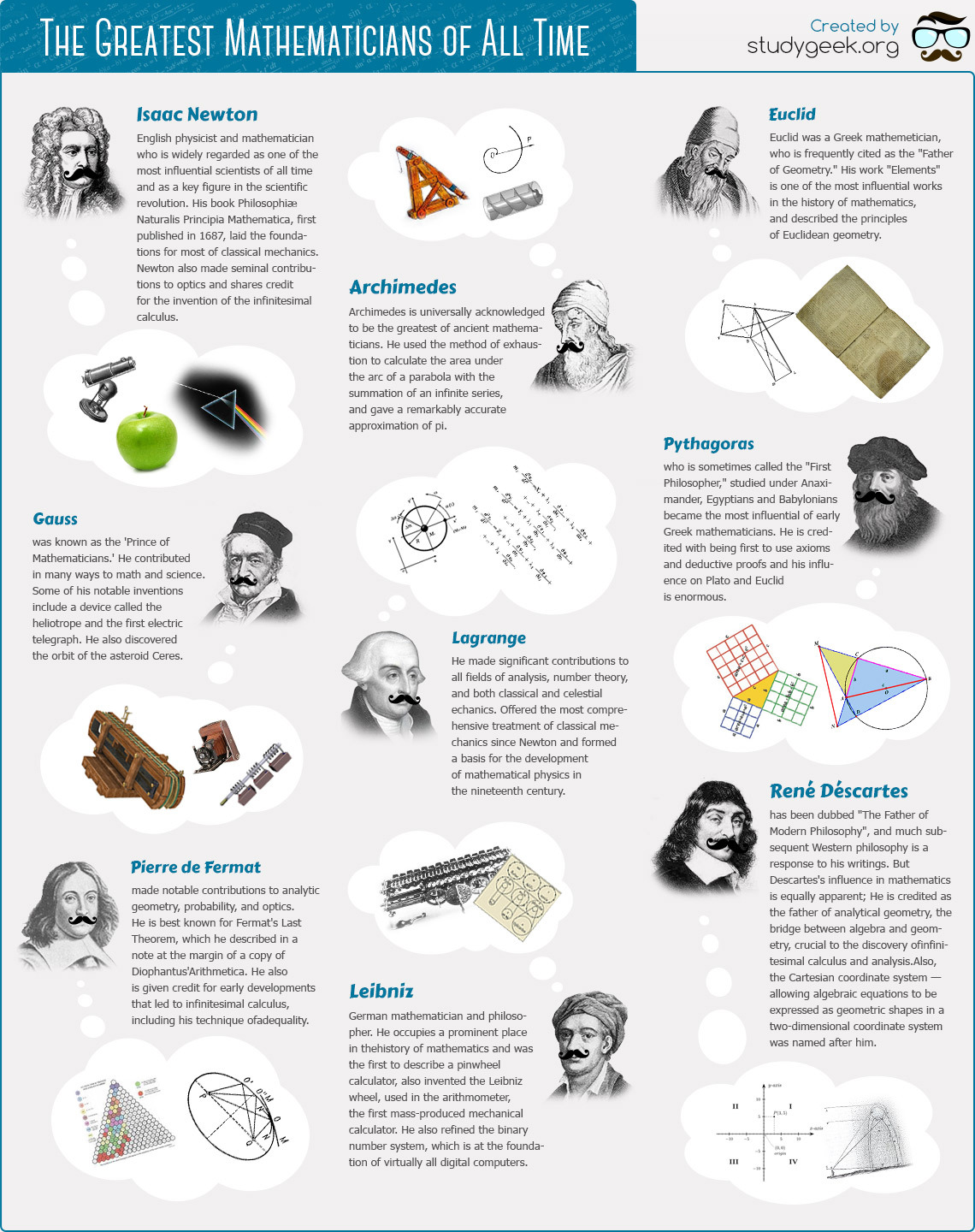
The Greatest Mathematicians of All Time - StudyGeek
Grades
6 to 12tag(s): biographies (102), famous people (40), newton (25), pythagorean theorem (19)
In the Classroom
Download this graphic and have it printed for use as a poster in your classroom. Display the graphic on your interactive whiteboard as an introduction to famous mathematicians. Have students research each mathematician and share their findings in presentations with a tool like Google Slides, reviewed here.Add your comments below (available only to members) | Become a Member
You must be registered and logged in to add items to your favorites.
Use the form at the top of the page to log in, or click here to join TeachersFirst (it's free!).
Add your comments below (available only to members) | Become a Member
Close comment form